
1. Home
  2. Solutions
  3. Goods receipt, shipping and loading control

Goods receipt, shipping and loading control

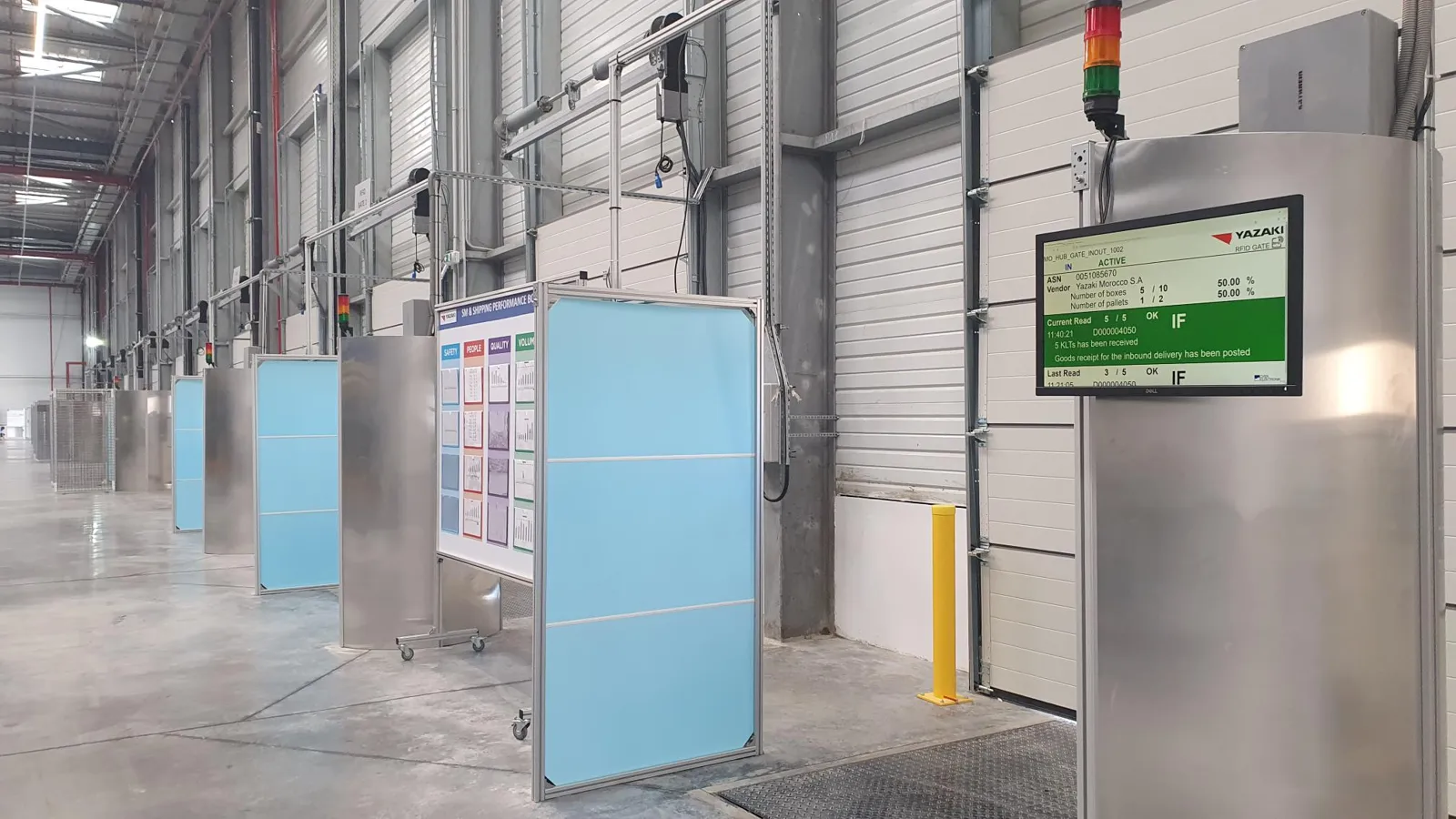
An RFID gate captures pallets, containers or cartons as they pass through the dock door and checks them against the delivery or loading order. Loading errors show up before the truck leaves the yard, and posting happens without manual scanning.

Forklift passing an RFID gate
What matters

What a gate has to do

What matters is what needs to be read: individual products, cartons or only load carriers. Then come direction detection, telling forklifts from people, goods that merely stand in the read field, and neighbouring dock doors that need shielding. Since every extra function adds cost, we build gates with exactly the functions your process needs.

How RFID gates work in practice

Different processes run at a dock door depending on the direction and the goods. Three typical examples: loading control in shipping, goods receipt checked against the advance shipping notice, and a cold store door where the temperature decides whether goods may go in. In each variant you can switch between two cases.

Door 5 · VL-30418
Reads 0
Events 0
Loaded 0 / 8

Isometric view of a loading dock. A truck is docked at door 5. In front of it stands an RFID gate made of two posts with antennas, a light barrier, a LiDAR sensor, a signal light, a monitor and an R-COM Agent. A forklift carries eight pallets from the staging area through the gate into the truck. The agent filters every read and reports it to R-COM Gateway, which checks it against the loading order and sends the result to the signal light, the monitor and the ERP.

    Fig. 1Dock door 5. One loading order, eight pallets, one posting. All values are examples.
    Step 1 of 5

    The order comes first

    The ERP sends loading order VL-30418 to R-COM Gateway. Door 5 now expects eight pallets for the truck at the dock, and the monitor shows the order.

    Loading order from the ERP (example)
    {
      "Order": "VL-30418",
      "Door": 5,
      "Route": 12,
      "Pallets": 8
    }

    What it looks like in R-COM Gateway

    Custom UIs are your own screens in R-COM Gateway: an overview of all dock doors for the shift lead, the status of every loading order, discrepancies in goods receipt and temperatures along the cold chain. They run on live data and your permissions. And you do not have to rely on us to build them.

    Three ways to your own overview

    1. 01Set up by us

      We build the screens to fit your process, as part of the project.

    2. 02Adapted by you

      You change columns, filters, limits or build entirely new views yourself in the software. No waiting for a new release.

    3. 03Created by AI

      Describe in your own words what you want to see. The AI integration in R-COM Gateway builds the dashboard from it with your live data, without a separate BI tool or extra licences.

      Show all of today’s loading orders that still have pallets missing, sorted by planned departure.

    R-COM Gateway · Custom UI · Dock doors · hall 1
    Dock doors · hall 1live via MQTT
    • Doors in use6 / 6
    • Trucks today23
    • Stopped1
    • Discrepancies1
    • in order
    • discrepancy
    • stopped or blocked
    • pallet or order
    Latest events
    1. Door 5: PLT-2214 belongs to VL-30422, loading stopped
    2. Door 3: ASN-58213 posted with discrepancy, 1 package missing
    3. Door 4: VL-30425 complete, goods issue posted
    4. Door 2: pallet …724180 blocked at 9.1 °C, QC informed
    5. Door 1: ASN-58219 complete, goods receipt posted
    Examples of custom UIs in R-COM Gateway, recreated. All values are examples.

    Use cases on film

    Cold storage · Gate 2

    One minute at one gate

    Readers report the same tag over and over, and scanners, sensors and cameras each deliver their own format. At the gate of a cold store, the film shows how R-COM Gateway turns this into a decision, right away instead of in tonight’s batch.
    1:27 · With subtitles

    Police · Weapons and equipment

    Who has which service weapon, right now?

    In a police proof of concept, on-metal RFID tags made service weapons readable: at the armory door, in an RFID tunnel, at the vehicle gate and with a handheld. The film shows how issue and return can be modelled in R-COM Gateway.

    1:00 · With subtitles

    Safety · Hazardous areas

    How many people are still inside?

    When the alarm sounds, every second counts. With RFID tags on badge or helmet and a reader gate at every airlock, each hazardous area knows how many people are inside, without sign-in sheets or headcounts. Badges are counted, not names.

    1:04 · With subtitles

    How we implement it

    1. Frames and antennas

      Standardised frames with mounts for readers and antennas, or flexible profile systems. Usually two or four antennas, plus ceiling or floor antennas where useful.

    2. Sensors

      Light barriers, LiDAR sensors for direction, speed and telling forklifts from people, and signal strength analysis across all antennas.

    3. Control at the gate

      The R-COM® Agent runs the logic at the gate that a reader alone cannot: filters, direction, signal lights, monitors and connection to machine controls, e.g. via Modbus/TCP.

    4. Matching and posting

      Gates are assigned to customer and loading orders and check target against actual. Posting runs via R-COM Gateway, OPC UA, MQTT or REST into ERP and WMS.

    What the solution does

    • Direction detection
    • Signal light and monitor at the door
    • Target/actual check against the order
    • Shielding of neighbouring doors
    • Readers from Siemens, Kathrein, Zebra, Impinj, FEIG and other manufacturers
    • Loan gates for pilot projects

    Gate variants from projects

    Standard gate

    One reader with four antennas for normal dock doors and passageways.

    XXL gate

    Two readers with eight antennas for wide doors, high loads and trucks driving through, for example at construction site entrances.

    Dual gate

    For transfer routes in both directions; direction detection separates inbound, outbound and forklifts just passing by.

    Loading control at the vehicle

    Antennas at the loading position read as the load is set down, including movable antennas that move up to a vehicle.

    Software

    The software behind this solution is R-COM Gateway. The platform controls readers, printers and handhelds, processes every event according to your rules and posts the result to SAP or other systems.

    More about R-COM Gateway

    FAQ

    Can a gate tell which direction goods are moving?

    Yes. We analyse the signal strength across several antennas or use light barriers and LiDAR sensors.

    Can we test a gate first?

    Yes. For pilot projects we provide complete gates and read stations on loan.

    What does the gate read on the package label?

    A unique package number that lets the WMS and ERP tell every pallet, carton or container apart. Which standard is behind it depends on the industry and the customer. In the automotive industry, package numbers with MH10 data identifiers are common (ANSI MH10.8.2, ISO/IEC 15418), for example on the Global Transport Label. In retail and consumer goods logistics the SSCC (Serial Shipping Container Code) to the GS1 standards (gs1.org) is widespread. Our examples show SSCCs; gates and R-COM Gateway handle both, as well as your own number ranges.

    Let's talk about your project

    An initial call with a consultant who knows your industry. Phone +49 621 4108 0 · info@data-elektronik.de