
Real-time location (RTLS)
Location systems show where load carriers, orders, vehicles or tools are right now. Depending on accuracy, area and object, passive UHF RFID, Bluetooth Low Energy or ultra-wideband can be used, often in combination.
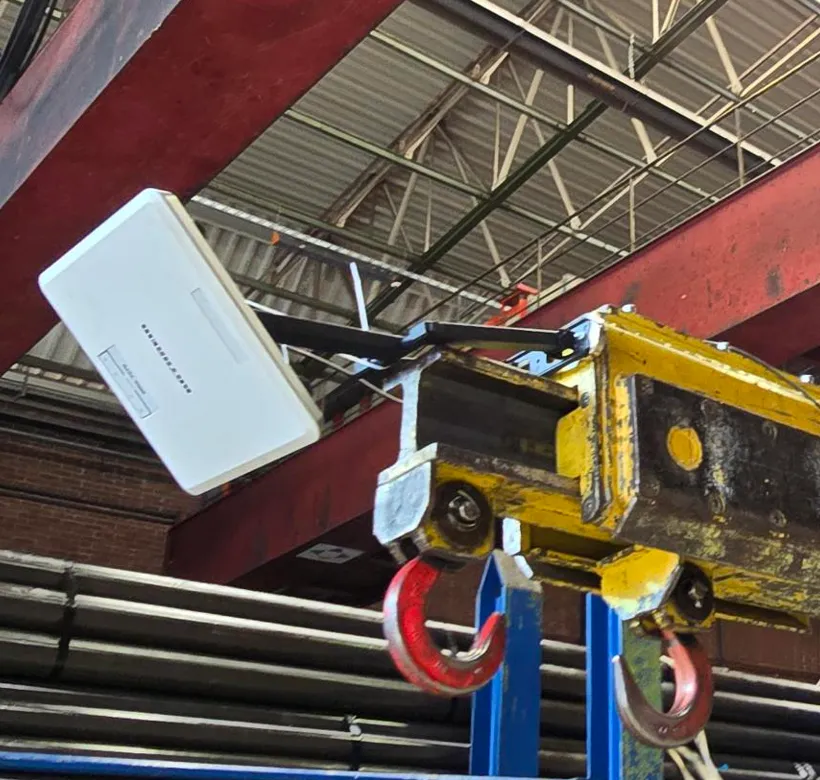
Which technology fits?
Passive UHF tags are inexpensive and need no battery. Ceiling-mounted readers can determine the position and movement of tagged objects. Active tags with a battery reach longer distances and suit large outdoor areas. Depending on the setup, BLE and UWB offer higher accuracy for individual, valuable objects. We find out which solution pays off in an on-site test.
How real-time location works in practice
Location is more than a dot on a plan. Three typical applications: load carriers in the zones of a hall, a device someone needs in a hospital and people in hazardous areas. In each variant you can switch between two cases.
Isometric view of a hall with the zones goods receipt, storage, production and shipping. Six anchor points stand along the edges of the hall. A forklift carries load carrier LT-3307, whose tag transmits regularly. From the signals at the anchors the system calculates the position and shows it on the floor plan. On every zone change R-COM Gateway raises an event, checks it against the order and reports it to WMS and MES.
The tag transmits, the anchors listen
Load carrier LT-3307 carries an active UWB tag. Every second it sends a signal that the calibrated anchor points along the edges of the hall receive. Which technology pays off is something we clarify first in an on-site test.
{
  "Tag": "T-3307",
  "Object": "Load carrier LT-3307",
  "Technology": "UWB",
  "Anchors": 6,
  "Interval": "1 s"
}Isometric view of a hospital ward with a corridor, nurses’ station and five patient rooms. Beds and infusion pumps carry tags. Every room has a BLE gateway; in the second case UWB anchors are added in the corridor and rooms. A nurse looks for a free infusion pump on the station computer. R-COM Gateway shows it in room 3.12, to the room with BLE and to within a few centimetres with UWB. The nurse fetches the pump and takes it to room 3.04. Every room change is an event. The ward, pharmacy and sterile services see the location in the same view, and R-COM Gateway updates it in SAP.
One gateway per room is enough
Every bed and every infusion pump carries a BLE tag with a long battery life. Each room has a BLE gateway that receives the tags nearby. That is enough to know which room a device is in.
{
  "Beds": "BLE",
  "Infusion pumps": "BLE",
  "Gateways": "1 per room",
  "Result": "Room"
}Isometric view of a building with the hazardous areas reactor hall and filling, with an assembly point in front. Each area has an airlock with a UHF RFID reader gate that detects the direction. Six people with helmets and badges go in, and the gates count every badge. One badge has expired safety training, and the shift lead receives a notice. Then the fire alarm goes off, everyone leaves the areas and the gates count the exits. R-COM Gateway gives the headcount per area to the shift lead and the fire brigade. In the second case one person stays in the reactor hall, and the fire brigade is told this area. Names are not captured.
The badge is counted, not the person
Every badge carries a UHF tag, or the tag sits in the helmet. The gate reads it hands-free, so nobody has to stop. R-COM Gateway models the badge, not the person: area, time of entry and safety training. Anonymous by default.
{
  "Badge": "B-20411",
  "Tag": "UHF, on badge",
  "Gate": "Airlock A",
  "Direction": "in",
  "Area": "Reactor hall",
  "Name": "not captured"
}
What it looks like in R-COM Gateway
Positions on their own help nobody. Custom UIs in R-COM Gateway turn them into tools: the floor plan in the control room, the device search on the ward, the headcount per area for the fire brigade. They run on live data and your permissions, and you can adapt them yourself.
Three ways to your own overview
- 01Set up by us
We build the screens to fit your process, as part of the project.
- 02Adapted by you
You change columns, filters, limits or build entirely new views yourself in the software. No waiting for a new release.
- 03Created by AI
Describe in your own words what you want to see. The AI integration in R-COM Gateway builds the dashboard from it with your live data, without a separate BI tool or extra licences.
Show on the floor plan all load carriers that have been in the same zone for more than two hours, and mark those without an order in red.
- Load carriers located148
- Anchors online6 / 6
- No signal1
- Zone without order1
- Load carrier
- at destination
- no signal for 10 min
- zone without order
- LT-3329 aisle → shipping, no order
- LT-3311 storage → shipping, order LS-80412
- LT-3320 goods receipt → storage
- LT-3324 no signal for 10 min
- LT-3307 → production, FA-50117
- Infusion pumps6
- Free2
- In use3
- Service due1
- free
- in use
- service due
- Status
- free
- Room
- Room 3.12
- Position
- next to bed 2
- Accuracy
- ± 10 cm · UWB
- Last seen
- 10:31:07
- for
- Room 3.04
- Match
- IP-2207, room 3.12
- Alternative
- IP-2211, room 3.10
- Alarm building Csince 10:52
- Still in building C1
- Counted out5
- Gates online4 / 4
- Site: plant 1
- Areas: all
- Display: anonymous
| Area | Airlock | People | Cleared | Status |
|---|---|---|---|---|
| C · Reactor hall | Airlock A | 1 | 2 of 3 | 1 person inside |
| C · Filling | Airlock B | 0 | 3 of 3 | clear |
| D · Laboratory | Airlock D | 4 | – | no alarm |
| D · Hazardous goods store | Airlock E | 2 | – | no alarm |
Badges are counted, not names. Bars: cleared relative to the count at the time of the alarm.
- Period
- today from 06:00
- Zone changes
- 1,284
- Rule violations
- 3
- Open
- 1
- ShippingLT-3329 without order, alert to shift lead and forklift driver, open
- AisleLT-3324 no signal for 10 min, last position known
- ProductionLT-3307 provided for FA-50117, MES notified
- ShippingLT-3307 without order, corrected after 22 s
- StorageLT-3307 from goods receipt, storage location updated in the WMS
- ShippingLT-3298 without order, taken to production after 4 min
- Zone without order
- Shift lead
- No signal > 10 min
- Maintenance
- Goods receipt > 2 h
- Dispatch
- WMS
- Storage location
- MES
- Provision
- Rule violation
Drugs, sterile goods, beds and pumps on one platform
In a hospital something is always on the move: drugs, containers from reprocessing, beds and infusion pumps. The film shows how R-COM Gateway brings barcode, RFID, BLE, UWB and vision together and posts every capture straight to SAP.
- Post drug consumption to the ward’s cost centre with a barcode scan
- Track wash and sterile containers through every cycle with RFID
- Locate beds and mobile devices with BLE, infusion pumps with UWB
- Count and check goods receipt with cameras
- Pharmacy, wards and sterile services see everything in one view
All figures in the film are examples.
How we implement it
Clarify requirements
Required accuracy, area, objects and how often positions should be updated.
Test
Pilot with test equipment in your environment before you invest.
Install
Mount and calibrate ceiling readers, antennas or anchors, and attach tags.
Evaluate
R-COM® Gateway shows locations on the floor plan, triggers events, for example when an object leaves a zone, and reports them to your systems.
What the solution does
- Locations on the floor plan
- Events on zone changes
- Combination with RFID gates
- Passive, active, BLE or UWB as required
- Connection to ERP, WMS and MES
Matching hardware
Software
The software behind this solution is R-COM Gateway. The platform controls readers, printers and handhelds, processes every event according to your rules and posts the result to SAP or other systems.
FAQ
How accurate is RFID location?
That depends on the system and setup. According to the manufacturer, the Zebra ATR7000 ceiling reader achieves around 0.6 m (R50). For higher accuracy, UWB systems are an option.
Let's talk about your project
An initial call with a consultant who knows your industry. Phone +49 621 4108 0 · info@data-elektronik.de